
2026 MONSTA X WORLD TOUR [THE X : NEXUS] IN BANGKOK
ซื้อบัตร / Buy Ticket ตรวจสอบรายการ / View Order สมัครสมาชิก / Register บัญชีของฉัน / My Account คำถามที่พบบ่อย/FAQวิธีการซื้อบัตร/How to Buy Ticket
2026 MONSTA X WORLD TOUR [THE X : NEXUS] IN BANGKOK
กำหนดการแสดง: วันเสาร์ที่ 7 มีนาคม 2569 เวลา 18.00 น.
สถานที่: ธันเดอร์โดม เมืองทองธานี
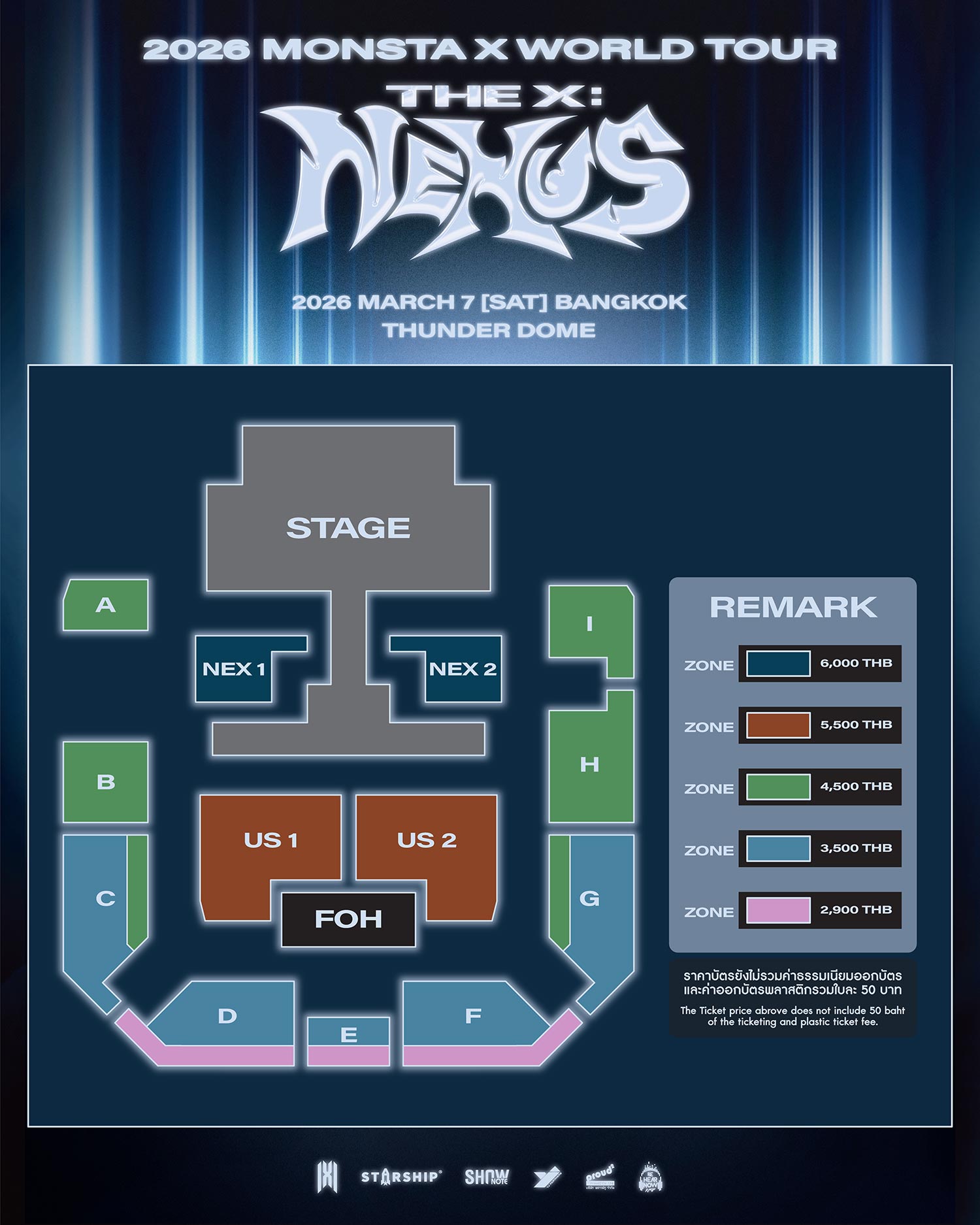
ราคาบัตร: 6,000 / 5,500 / 4,500 / 3,500 และ 2,900 บาท
กำหนดการเปิดจำหน่ายบัตร: วันเสาร์ที่ 7 กุมภาพันธ์ 2569 เวลา 10.00 น. เป็นต้นไป
ช่องทางการจำหน่าย: www.behearnowkpop.biz
Terms and Conditions รายละเอียดและขั้นตอนการสั่งซื้อ (เงื่อนไขและข้อกำหนด)
1. ผู้ที่ต้องการซื้อบัตร จะต้องเข้าไปลงทะเบียนสมัครสมาชิกที่หน้าเว็บไซต์หลัก www.behearnowkpop.biz โปรดตรวจสอบความถูกต้องของข้อมูลส่วนตัวทั้งหมดก่อนกด "สมัครสมาชิก" ข้อมูลที่สมัครแล้วไม่สามารถเปลี่ยนแปลงได้
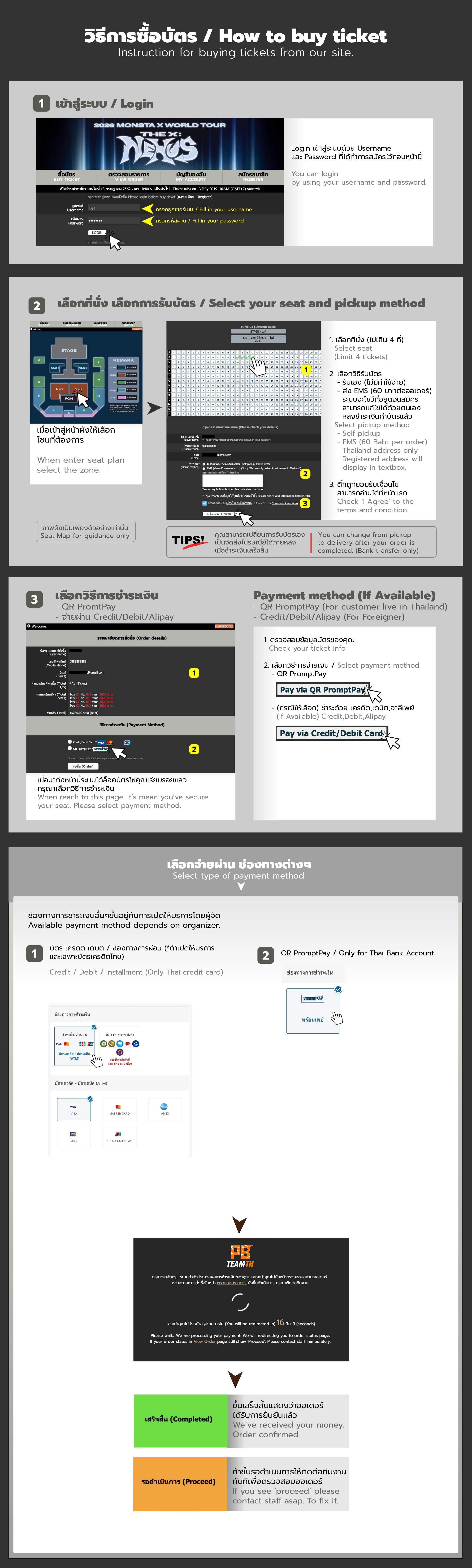
2. เมื่อเปิดจำหน่าย มีขั้นตอน ดังนี้
2.1. Login โดยใช้ User, Password ที่ลงทะเบียนไว้แล้ว
2.2. เลือกโซน ที่ต้องการ
2.3. เลือกที่นั่งที่ต้องการ , เลือกวิธีการรับบัตร (รับเอง หรือ EMS มีค่าจัดส่ง 60 บาท และส่งในประเทศไทยเท่านั้น) แล้วกดไปขั้นตอนถัดไป
2.3.1 กรณีเลือกรับเอง รับที่หน้างานก่อนเวลาแสดงประมาณ 4 ชม. รับได้จนถึงเวลาเริ่มการแสดง
2.3.2 *แนะนำ เพื่อลดความแออัดหน้าสถานที่จัดงาน* กรณีเลือกจัดส่ง EMS จัดส่งประมาณวันที่ 26 กุมภาพันธ์ 2569 ด้วยไปรษณีย์ไทย โดยมี tracking no. แจ้งในหน้า ‘ตรวจสอบรายการ’ (View Order) เลขที่สั่งซื้อที่เป็น EMS เจ้าของยูสเซอร์ต้องตรวจสอบที่อยู่ในหน้าตรวจสอบรายการก่อนถึงกำหนดการจัดส่งอย่างน้อย 1 สัปดาห์ หากข้อมูลที่อยู่จัดส่งที่หน้าตรวจสอบรายการไม่ครบถ้วน ขอสงวนสิทธิ์ไม่จัดส่ง และไม่คืนค่าจัดส่ง
2.4 เลือกวิธีการชำระเงิน แล้วกดสั่งซื้อ หากชำระเงินไม่ผ่าน สามารถเข้าเมนู “View My Order” เพื่อเลือกวิธีชำระแบบอื่นหรือทำการชำระใหม่
2.4.1 กรณีเลือกชำระผ่านบัตรเครดิต, เดบิต, ผ่อนชำระ และ คริปโต จะเข้าสู่การชำระด้วยระบบ ( มีค่า Convenience Fee เพิ่มเติม 4%) เลขที่สั่งซื้อที่ชำระผ่านระบบเรียบร้อยจะมีสถานะเป็น "เสร็จสิ้น" ทันที ไม่ต้องแจ้งโอน หากชำระไม่สำเร็จ หรือต้องการเปลี่ยนบัตร ให้ไปที่เมนู View Order เพื่อชำระอีกครั้ง โดยต้องชำระก่อนหมดเวลาออเดอร์อย่างน้อย 15 นาที
2.4.2 กรณีเลือกชำระผ่าน QRCode / Prompt Pay / ShopeePay จะเข้าสู่การชำระด้วยระบบ ท่านสามารถชำระผ่าน Application ของทุกธนาคารไทย ( มีค่า Convenience Fee เพิ่มเติม 2%) เลขที่สั่งซื้อที่ชำระผ่านระบบเรียบร้อยจะมีสถานะเป็น "เสร็จสิ้น" ทันที ไม่ต้องแจ้งโอน หากชำระไม่สำเร็จ หรือต้องการเปลี่ยนบัตร ให้ไปที่เมนู View Order เพื่อชำระอีกครั้ง โดยต้องชำระก่อนหมดเวลาออเดอร์อย่างน้อย 15 นาที
2.5 จำกัดการจองสูงสุด 4 ใบ ต่อ 1 บัญชีผู้ใช้ (User) หากตรวจพบการจองที่ผิดปกติหรือพยายามเลี่ยงข้อกำหนดในทุกกรณี ทีมงานขอสงวนสิทธิ์ในการยกเลิกรายการโดยไม่ต้องแจ้งให้ทราบล่วงหน้า และไม่มีนโยบายคืนเงิน
3. ราคาบัตรนี้ ยังไม่รวมค่าดำเนินการและค่าออกบัตรพลาสติก ใบละ 50 บาท
4. หลังจากที่ผู้จองกดส่งข้อมูลการจองแล้ว ผู้จองไม่สามารถแก้ไขข้อมูลการจอง หรือยกเลิกการจองได้ทุกกรณี และทางทีมงานไม่สามารถทำการคืนเงินได้ หากท่านไม่สามารถมาร่วมชมการแสดง หลังจากที่ได้ซื้อบัตรไปแล้ว
5. โปรดทราบว่าเว็บไซต์นี้ เป็นตัวแทนจำหน่ายที่ได้รับอนุญาตแต่เพียงผู้เดียว บัตรเข้าชมงานไม่สามารถนำไปเสนอขายต่อเกินราคาได้ หากท่านไม่ปฏิบัติตามเงื่อนไข บัตรของท่านอาจถูกยกเลิกโดยไม่ได้รับเงินคืน บัตรที่ซื้อจากเว็บไซต์อื่น ๆ หรือ บุคคลที่สามและผู้จัดจำหน่ายที่ไม่ได้รับอนุญาต เช่น Viagogo, Stubhub หรือที่คล้ายกันนี้ จะถือเป็นโมฆะและไม่สามารถใช้เข้าชมงานได้
6. เว็บไซต์นี้จัดทำภายในการดำเนินงานของบริษัท BeHearNowKpop ระบบบัตรดำเนินการโดย PBTeam
หมายเหตุ:
ติดตาม และสอบถามเพิ่มเติมเกี่ยวกับกิจกรรม
Facebook : https://www.facebook.com/BeHearNowKpop
ติดต่อทีมบัตร / เว็บไซต์
Line @PBTicketTeam1 https://line.me/R/ti/p/%40pbticketteam1
Email pbticketteam@gmail.com
2026 MONSTA X WORLD TOUR [THE X : NEXUS] IN BANGKOK
Date: Saturday, 7 March 2026 at 6:00 PM (GMT+7)
Venue: Thunder Dome, Muang Thong Thani
Ticket Prices: 6,000 / 5,500 / 4,500 / 3,500 and 2,900 THB
Ticket Open: Saturday, 7 February 2026 at 10:00 AM (GMT+7) onwards
Sale Channel: www.behearnowkpop.biz
Terms and Conditions | Ticket Purchase Details and Procedures
1. Buyers must register for membership on the website at www.behearnowkpop.biz . Please carefully review the accuracy of all personal information before clicking “Register”, as registered information cannot be changed once submitted.
2. When ticket sales open, please follow the steps below:
2.1. Log in using registered username and password.
2.2. Choose Seating Zone
2.3. Choose your Seat, Pick up method (Self Pick up or EMS with delivery fee is 60 THB), and click Order. (*Remark; EMS is applicable only buyer who lives in Thailand)
2.3.1 If you choose Self-pick up, you can pick it up at the venue. Approximately 4 hours before the show time, until the show starts.
2.3.2 If you choose EMS, delivery will start on 26th Feb 2026 via Thailand Post. The tracking number can be found in the ‘View My Order’ menu. The user owner must check the address at ‘view order’ at least 1 week before the delivery period. If delivery information is incomplete. We reserve the right not to deliver the tickets, and the delivery fee will not be refunded.
2.4. Choose payment method
2.4.1. For credit or debit card payments, the transaction will be processed through the system with an additional 4% Convenience Fee. Once the order is successfully paid, it will be marked as "Completed" instantly. No need to inform about the transfer. If payment fails or if you want to change the card, go to the "View Order" menu to make another payment. Payment must be made within 15 minutes after making a ticket reservation.
2.4.2 For QR Code / Prompt Pay / ShopeePay payments, you can pay using the application of any Thai bank with an additional 2% Convenience Fee. Once the order is successfully paid through the system, it will be marked as "Completed" instantly. No need to inform about the transfer. If payment fails or if you want to change the card, go to the "View Order" menu to make another payment. Payment must be made within 15 minutes after making a ticket reservation.
2.5 Each user account is limited to a maximum of 4 tickets in total. Any suspicious or rule-evading booking behavior may result in order cancellation without prior notice, and refuse a refund in all such cases.
3. Ticket price is EXCLUDED the issuing plastic cards 50 THB per ticket
4. After the reservation is submitted, the member is not allowed to change any reservation details and cannot cancel the reservation in any cases with no refund.
5. Please note that this website is the only authorized distributor. Tickets purchased cannot be resold, refunded, exchanged, cannot be transferred or resold to others. The organizer reserves the right to cancel the ticket with no prior notice and with no refund or other compensation. Tickets purchased from other websites or third parties and unauthorized distributors such as Viagogo, Stubhub or similar will be considered void and cannot be used to visit the event.
6. This website is operated under BeHearNowKpop Co.Ltd Ticketing System powered by PBTeam.
For more information about the event
Facebook : https://www.facebook.com/BeHearNowKpop
Website Team
Line @PBTicketTeam1 https://line.me/R/ti/p/%40pbticketteam1
Email pbticketteam@gmail.com
คำถามที่พบบ่อย/F.A.Q
Ticket FAQ
Q1 : สมัครสมาชิกในเว็บไซต์อย่างไร / ใช้ข้อมูลอะไรบ้าง / มีค่าใช้จ่ายหรือไม่
A1 : การสมัครสมาชิกในเว็บไซต์ สมัครได้ที่เมนู ‘สมัครสมาชิก’ โดยใช้ข้อมูลดังต่อไปนี้ Username ที่ต้องการ (ตัวอักษรเท่านั้น ห้ามมีเว้นวรรคหรืออักษรพิเศษ), Password, ชื่อ-นามสกุลตามบัตรประชาชน (หรือพาสปอร์ต), เพศ, ปีเกิด, ที่อยู่สำหรับจัดส่งเอกสาร, เบอร์โทรศัพท์, อีเมลที่ติดต่อได้ (สมัครฟรีไม่เสียค่าใช้จ่ายใด ๆ)
- หลังการสมัคร ท่านจะได้รับอีเมลจากระบบ ส่ง link ให้ท่านคลิกเพื่อ activate ยืนยันให้ user ของท่านใช้งานได้ โดยผู้สมัครจะมี user และ password ของตนเอง เพื่อนำไปใช้ในการซื้อบัตรหรือร่วมกิจกรรมอื่น ๆต่อไป
- สำหรับท่านที่ไม่ได้รับ automail ในการยืนยันการสมัคร ให้ลองสมัครใหม่โดยใช้อีเมลเดิม ระบบจะทำการส่งอีเมลเพื่อยืนยันตัวซ้ำไปอีกครั้งโดยอัตโนมัติ ถ้าเป็นไปได้กรุณาใช้ gmail ในการลงทะเบียนจะพบปัญหาน้อยที่สุด
- เมื่อสมัครเรียบร้อยแล้ว แนะนำให้ทดสอบ log in ที่เมนู ‘บัญชีของฉัน’ โดยใช้ User, Password ของท่าน เพื่อตรวจสอบผลการสมัคร
- กรุณาตรวจสอบความถูกต้องของข้อมูลส่วนตัวทั้งหมดที่ใช้ในการสมัคร ข้อมูลนี้จะไม่สามารถเปลี่ยนแปลงได้
Q2 : ลืม User / Password ทำอย่างไร?
A2 : กด ‘ลืมรหัสผ่าน’ ระบบจะให้ระบุอีเมลที่ใช้สมัคร และระบบจะส่งอีเมลเพื่อใช้ในการรีเซ็ต password พร้อมแจ้ง User ที่ท่านใช้สมัครไปพร้อมกัน ไม่สามารถส่งลิ้งค์รีเซ็ตรหัสผ่านไปในช่องทางอื่นนอกเหนือจากอีเมลที่ใช้สมัครของยูสเซอร์นั้น ๆ
Q3 : เวลาของระบบเป็นเวลาเท่าไหร่ เทียบเวลาได้ที่ไหน?
A3 : ระบบตั้งเวลามาตรฐานตรงตามกรมอุทกศาสตร์ สามารถเทียบเวลาได้ที่ โทร 1811
Q4 : ในวันจอง สามารถ Log in ก่อนเวลาจองได้หรือไม่?
A4 : สำหรับท่านที่สมัครสมาชิกไว้แล้ว ท่านสามารถล็อคอินได้ที่หน้า 'ตรวจสอบรายการ' โดยระบบจะเปิดให้ทดลอง Log in ก่อนเวลาเปิดจองบัตรประมาณ 1 ชม. และก่อนถึงเวลาเปิดจองประมาณ 10-15 นาที ให้ท่านรีเฟรชหน้าดังกล่าว และล็อคอินอีกครั้งเพื่อเตรียมกดที่เมนู "ซื้อบัตร" ตามเวลาที่ระบบกำหนด
- ในช่วงก่อนเวลาเปิดจองบัตร 1 ชม. หากท่านเข้าเว็บไซต์แล้วยังไม่เห็นเมนู 'ซื้อบัตร (Buy Ticket)' ให้ลบ history ลบคุกกี้จากอุปกรณ์ของท่าน แล้วเข้าเว็บไซต์อีกครั้ง
Q5 : 1 User สามารถ Log in ได้จากหลายเครื่องหรือไม่?
A5 : 1 User สามารถ Log in เข้าใช้งานพร้อมกันได้มากกว่า 1 เครื่อง แต่ไม่แนะนำ เพราะอาจเกิดการจองซ้ำซ้อนใน user เดียวกัน หากระบบตรวจสอบพบการจองจาก user เดียวกันเข้ามากผิดปกติ อาจจะถูกตรวจสอบ / สอบถามเพิ่มเติม / พิจารณายกเลิกออเดอร์ หรืออื่น ๆ
- User ที่มีออเดอร์กดจองโดยที่ไม่โอนเงินจะถูกเจ้าหน้าที่ระบบพิจารณาอย่างใกล้ชิด หากตรวจสอบพบว่าเป็นความตั้งใจ อาจถูกแบนยูสเซอร์ในลำดับถัดไป
Q6 : ในการจองบัตร 1 ครั้ง สามารถจองได้กี่ใบ / กี่โซน / 1 User จองได้กี่ใบ?
A6 : ในการจองบัตร 1 ครั้ง จะสามารถจองได้ครั้งละ 1-4 ใบ ในรอบและโซนเดียวกันเท่านั้น หากต้องการโซนอื่นด้วย ให้ทำการจองเข้ามาใหม่อีกครั้ง
- ก่อนการกดจองบัตร โปรดพิจารณาจำนวนบัตรที่ท่านเลือกให้ถี่ถ้วน เพราะเมื่อกดจองแล้วจะไม่สามารถเปลี่ยนแปลงจำนวนได้ การโอนเงินต้องโอนพร้อมกันทั้งออเดอร์ไม่สามารถโอนเพียงใบใดใบหนึ่งได้ ถ้าท่านโอนไม่ครบ หากเจ้าหน้าที่อาจพิจารณายกเลิกออเดอร์ ท่านต้องกดบัตรใหม่ในรอบที่หลุดรอบถัดไปให้เท่ากับยอดเงินที่ท่านโอนเข้ามา ซึ่งจะทำให้ท่านเสียสิทธิในที่ดี ๆ ที่ท่านเคยกดได้
- จำกัดการจองสูงสุด 4 ใบ ต่อ 1 บัญชีผู้ใช้ (User) หากตรวจพบการจองที่ผิดปกติหรือพยายามเลี่ยงข้อกำหนดในทุกกรณี ทีมงานขอสงวนสิทธิ์ในการยกเลิกรายการโดยไม่ต้องแจ้งให้ทราบล่วงหน้า และไม่มีนโยบายคืนเงิน
Q7 : เลือกชำระเงินด้วยบัตรเครดิต / เดบิต แล้วระบบจะเป็นอย่างไร / ตัดบัตรไม่ผ่าน / กรอกข้อมูลบัตรผิด ทำอย่างไร?
A7 : กรณีเลือกชำระด้วยบัตรเครดิต / เดบิต หากระบบสามารถตัดยอดชำระได้ตามขั้นตอน สถานะของออเดอร์นั้นจะเป็น 'เสร็จสิ้น (Complete)' ทันที
- หากระบบไม่สามารถตัดยอดบัตรเครดิตไม่ว่าด้วยกรณีใด ๆ ท่านสามารถเลือกวิธีชำระเงินได้อีกครั้งที่หน้าตรวจสอบรายการ ดังนี้
- เลือกชำระด้วยบัตรเครดิตอีกครั้ง ให้เลือก ‘จ่ายด้วยบัตรเครดิต’ ทันที ในออเดอร์นั้น
- เลขที่สั่งซื้อที่ชำระด้วยบัตรเครดิต ที่สถานะไม่เป็น 'เสร็จสิ้น (Complete)' จะถูกลบเมื่อครบเวลาที่ระบุในสถานะของแต่ละเลขที่สั่งซื้อ
Q8 : เปลี่ยนที่อยู่ในการจัดส่งบัตร / เปลี่ยนจากรับเองเป็น EMS / เปลี่ยนจาก EMS เป็นรับเอง / วิธีการเช็ค Tracking
A8 : ที่อยู่ในการจัดส่งบัตรสามารถเปลี่ยนได้ด้วยตนเองในหน้า 'ตรวจสอบรายการ (View Order)' หลังจากสถานะออเดอร์เปลี่ยนเป็น 'เสร็จสิ้น (Complete)' แล้ว
- สำหรับชื่อจ่าหน้าซอง ระบบจะแสดงตามชื่อเจ้าของ User ตามที่สมัครสมาชิกมา และจัดพิมพ์ซองด้วยชื่อผู้รับดังกล่าวไม่สามารถเปลี่ยนแปลงได้
- ที่อยู่ในการจัดส่งสามารถเปลี่ยนแปลงได้ในแต่ละเลขที่สั่งซื้อ ท่านสามารถเพิ่มชื่อผู้รับท่านอื่น หรือข้อความจำเพาะใด ๆ ที่ท่านต้องการได้โดยอิสระ จนถึงวันที่ประกาศกำหนดการจัดส่งและกำหนดการปิดแก้ไขที่อยู่ในหน้าเว็บไซต์
- กรณีต้องการเปลี่ยนจาก EMS เป็นรับเอง ท่านสามารถแก้ไขที่อยู่เป็น "รับเอง" เจ้าหน้าที่จะทราบโดยอัตโนมัติว่าออเดอร์นี้เปลี่ยนเป็นรับหน้างาน แต่สถานะ EMS ของท่านยังคงอยู่ เพราะหลังจากท่านเลือก EMS ไปแล้วไม่สามารถขอคืนค่า EMS ได้
- กรณีต้องการเปลี่ยนรูปแบบการรับจาก 'รับเอง' เป็น ‘EMS' สามารถเปลี่ยนได้หลังจากที่สถานะออเดอร์เป็น 'เสร็จสิ้น (Complete)' แล้ว โดยให้ไปแก้ไขรูปแบบการจัดส่งด้วยตนเองได้ในหน้า 'ตรวจสอบรายการ (View Order)' และชำระค่าจัดส่งผ่านหน้าเว็บไซต์ 60 บาท / 1 ออเดอร์ หลังจากนั้นที่อยู่ของท่านจะขึ้นในออเดอร์ หากไม่ขึ้น โปรดติดต่อเจ้าหน้าที่
- EMS จะจัดส่งก่อนวันงานประมาณ 5-10 วันขึ้นอยู่กับการจัดพิมพ์บัตรของผู้จัดงาน เมื่อถึงวันประกาศจัดส่ง ท่านสามารถตรวจสอบเลข Tracking Number ในหน้า ‘ตรวจสอบรายการ (View Order)' บัตรที่จัดส่งจะเป็นบัตรตัวจริงสำหรับเข้างาน
Q9 : เลือกรับบัตรเอง รับที่ไหน ต้องเตรียมอะไรบ้าง?
A9 : เลือกรับบัตรเองรับได้ที่เคาเตอร์บัตรหน้างาน ก่อนเวลาเริ่มคอนเสิร์ตประมาณ 6 ชม. รับได้จนถึงเวลาเริ่มแสดง (เวลาการรับอาจเปลี่ยนแปลงได้ โปรดติดตามประกาศการรับบัตรอย่างเป็นทางการทางแฟนเพจเฟสบุ๊คผู้จัดงานอีกครั้ง โดยปกติจะประกาศก่อนวันงานประมาณ 5-10 วัน)
*การรับบัตรจะเป็นการรับบัตรไปทั้งออเดอร์เท่านั้น ไม่สามารถแยกรับได้*
- กรณีผู้รับไม่ใช่เจ้าของยูสเซอร์ ผู้รับต้องนำสำเนาบัตรประชาชนของเจ้าของยูสเซอร์ที่เขียนรับรองสำเนามอบอำนาจ ดังนี้
"สำเนาถูกต้อง ข้าพเจ้า...(ชื่อ-สกุลเจ้าของบัตร)... มอบอำนาจให้คุณ...(ชื่อ-สกุลผู้รับแทน) เป็นผู้รับบัตรงาน (ชื่องาน) เลขที่ใบสั่งซื้อ……. แทน" (ปริ๊นท์เป็นกระดาษ) พร้อมบัตรประชาชนผู้รับแทน, เลขที่ใบสั่งซื้อ
สำเนาบัตรที่มีข้อความการมอบอำนาจต้องปริ๊นท์เป็นเอกสาร หรือถ่ายเอกสาร ซึ่งเจ้าหน้าที่จะเก็บไว้เป็นหลักฐาน ส่วนเลขที่ใบสั่งซื้อแสดงเป็นภาพถ่ายจากโทรศัพท์มือถือได้
ภาพตัวอย่างวิธีการเขียนมอบอำนาจ
http://128.199.161.100/howtopickup.jpg
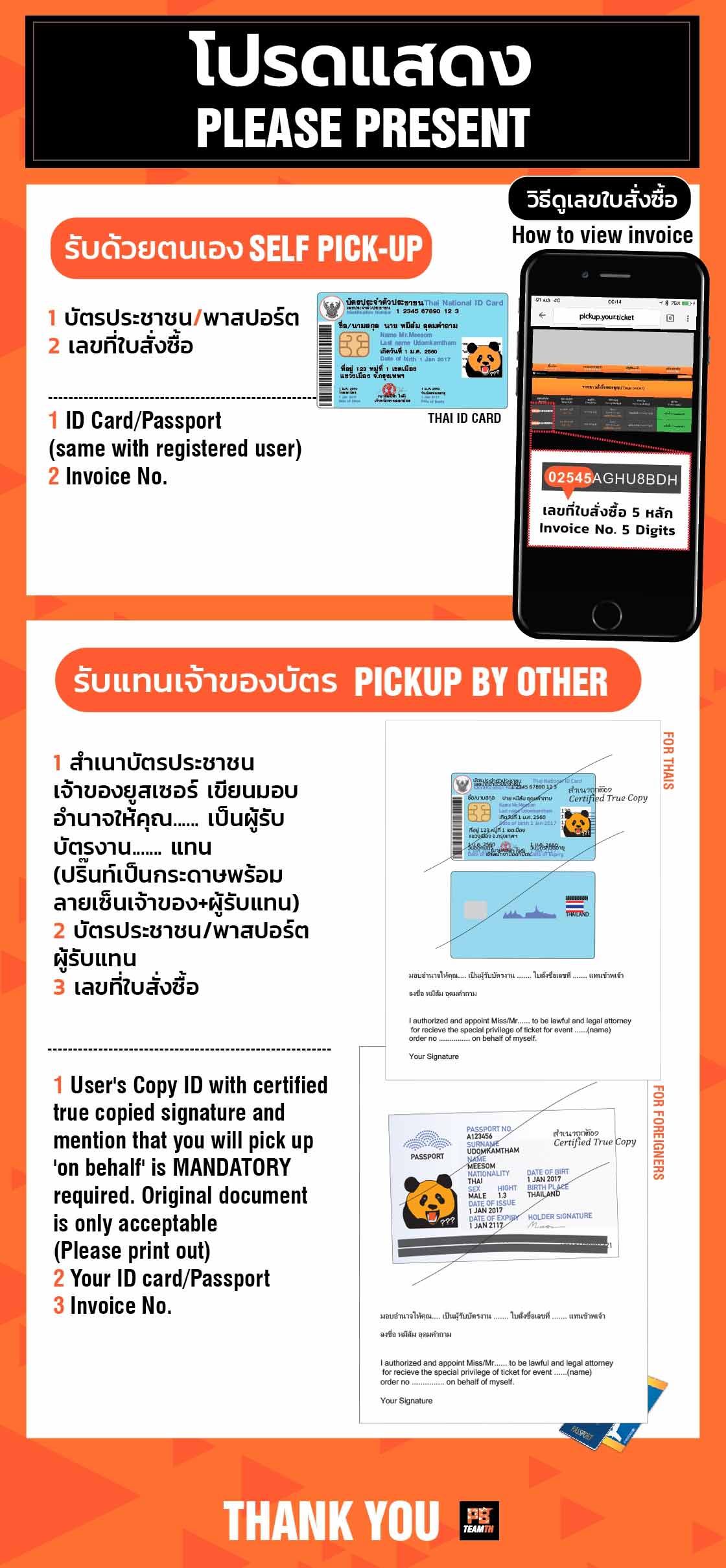
- กรณีเจ้าของยูสเซอร์รับด้วยตัวเอง นำบัตรประชาชนที่มีชื่อ-สกุลตรงตามที่ใช้สมัครสมาชิก, เลขที่ใบสั่งซื้อ
Q10 : รายชื่อผู้โชคดี / กติกาและสิ่งของต้องห้ามในการเข้าชม / จุดรับฝากของศิลปิน / สินค้าออฟฟิเชียล
A10 : การประกาศรายชื่อผู้โชคดี / กติกาและสิ่งของต้องห้ามในการเข้าชม / จุดรับฝากของศิลปิน / สินค้าออฟฟิเชียล (ถ้ามี) มักจะเป็นการประกาศจากทางผู้จัดในหน้าเพจก่อนวันงานประมาณ 7 วัน
ติดต่อทีมบัตร
Line @PBTicketTeam1 https://line.me/R/ti/p/%40pbticketteam1
Email pbticketteam@gmail.com
Ticket FAQ
Please read and follow all instructions below for your benefits;
Q1: How can I register for membership? What information is required? Is there any registration fee?
A1: User can register membership on the website
The following information is required: Desired username (letters only, no spaces or special characters), Password, Full name as shown on your ID card or passport, Gender, Year of birth, Shipping address, Telephone number, Valid email address. Membership registration is free of charge.
- After registration, the system will send an activation email containing a link for account verification. Once activated, you will have your own username and password to purchase tickets and participate in other activities.
- In case you do not receive the activation email, please try registering again using the same email address. The system will automatically resend the activation link.
We recommend using Gmail, as it has the least issues from previous cases.
- After successful registration, please log in via “My Account” to verify your membership status.
- Please ensure that all personal information is correct, as registered information cannot be changed.
Q2: What should I do if I forget my username or password?
A2: Please click “Forgot Password” and enter the email address used during registration. The system will send a password reset link and your registered username to that email address. Password reset links can only be sent to the registered email address and cannot be sent via other channels.
Q3: What time standard does the system use? Where to compare timezone?
A3: The system follows the official time standard of the Hydrographic Department, Royal Thai Navy. You may check or compare the time by calling 1811.
Q4: Can users log in before the ticket sales start?
A4: Registered members may log in in advance via the “View Order” page. The system allows test login approximately 1 hour before ticket sales open. Please refresh the page and log in again 10–15 minutes before the official sales time, then proceed to the “Buy Ticket” menu once it becomes available. If you do not see the “Buy Ticket” button, please clear your browser history and cookies, then access the website again.
Q5: Can one user log in from multiple devices at the same time?
A5: A single user account may log in from multiple devices simultaneously; however, this is not recommended, as it may cause duplicate or conflicting orders. If the system detects unusual booking activity from the same user, the order may be reviewed, investigated, or cancelled.
- Users who repeatedly reserve tickets without completing payment may be closely monitored.
If intentional misuse is detected, the account may be suspended or blocked from future purchases.
Q6: How many tickets and zones can be booked per order / per user?
A6: Each order allows the purchase of 1–4 tickets for the same round and the same seating zone only. If you want to purchase tickets in a different zone, you must place a new order.
- Please carefully review the number of tickets before confirming your order, as changes cannot be made after submission. Payment must be completed in full per order. Partial payments or payment for individual seats are not allowed. If the payment amount is incomplete, the order may be cancelled by the system or staff. In such cases, you will need to purchase tickets again in the next available round, selecting seats that match the transferred amount. This may result in the loss of previously selected seats.
- Each user account is limited to a maximum of 4 tickets in total. Any suspicious or rule-evading booking behavior may result in order cancellation without prior notice, and refuse a refund in all such cases.
Q7: If I choose to pay by credit/debit card, how does the system work? What should I do if the card payment fails or if incorrect card details are entered?
A7: If payment by credit or debit card is successfully processed, the order status will be updated to “Complete” immediately.
- If the payment fails for any reason, you may retry payment by selecting “Pay by Credit Card” again via the View Order page.
- Orders that do not reach “Complete” status within the specified time limit will be automatically cancelled by the system.
Q8: How can I change the delivery address, pickup method, or check EMS tracking?
A8: You can change shipping address in ‘view order’ page after your order status is updated to ‘complete’
- Name printed on envelope is followed as user registered since first time and cannot be changed but allowed to put additional name in address field
- Address can be changed/updated before ticket distribution which will be announced via webpage
- If you want to change the pick up method to ‘self-pick up’, please update the address field as pick up, staff will notice automatically. But your EMS status remains because after you have chosen EMS, you cannot request a refund for delivery cost.
- If you want to change from self-pick up to ‘EMS’, you can change after your order status is changed to ‘complete’ by go to ‘View Order’ page, change method as EMS, make payment at 60 baht per order. Your address will be updated. If not, please contact admin staff for checking
- EMS will be sent 7-10 days before show day. Please check ‘tracking number’ via the view order page. It's the official ticket for a concert entry.
You can update the delivery address via View Order after the order status becomes “Complete”.
- The recipient name printed on the envelope will follow the registered user’s name and cannot be changed. However, additional details or alternate recipient names may be added in the address field.
- Address changes are allowed until the address modification deadline, which will be announced on the webpage.
- To change from EMS to Self Pick-up, update the address field to indicate “Self Pick-up”. (EMS fees are non-refundable once selected.)
- To change from Self Pick-up to EMS, you can change after your order status is changed to 'complete’, update the delivery method via View Order, then pay the 60 THB EMS fee per order. Your address will be updated. If not, please contact admin staff for checking.
- EMS tickets will be sent approximately 5–10 days before the event, Tracking numbers will be available via View Order. Tickets delivered by EMS are official tickets for event entry.
Q9: If I choose self pick-up, where and how can I collect my tickets?
A9: Tickets can be collected at the ticket counter at the venue approximately 6 hours before show time, until the show begins. The pickup schedule may change. Please check the official announcement again 5–10 days before the event.
Tickets must be collected as a complete order and cannot be split.
- If collected by another person:
A printed authorization letter and a certified true copy of the registered user’s ID card, authorize you….(name/ surname)… as receiver and sign. Must be provided, along with the collector’s ID and order number.
Authorization documents must be printed on paper. Staff will retain them as records. Order numbers may be shown via mobile phone.
Example image showing how to write a power of attorney.
http://128.199.161.100/howtopickup.jpg
- If collected by the registered user:
Please present your ID card or passport and order number.
Q10: Where can I find information about the lucky winner announcement, rules, prohibited items, deposit points, and official merchandise?
A10: Information regarding the lucky winner, event rules, prohibited items, deposit points, and official merchandise (if any) will be announced via the official webpage approximately 7 days before the event.
Ticket Team Line @PBTicketTeam1 https://line.me/R/ti/p/%40pbticketteam1
Email pbticketteam@gmail.com
ประกาศการจัดส่งบัตร
Annoucement for upgrade and change seat
วิธีการซื้อบัตร / How to Buy